11 — Member form authoritative flow (PM video)
Authority: PM Fahim’s voiceover walkthrough of mForm V2 production, recorded 2026-05-19 (7:58 mobile screen capture). This note + the embedded spec under
pm-spec/2026-05-19/are the source of truth for the Member doctype flow going forward. When this contradicts the V2 form 1000 JSON (raw/mform-forms/1000.json), the video wins; when the video doesn’t show a picker, fall back to the V2 JSON for option lists.
Key realisation: viewSequence, not order
V2 has two numbering schemes per question and we built off the wrong one:
| Field | Purpose | Use for |
|---|---|---|
question.order | Stable question ID (never changes; how parent[].order refers) | xref / conditional logic / serialisation |
question.viewSequence | Display position 1..N in V2’s rendered form | UI rendering order |
Our V3 ordered the form by order (which is just question ID) and broke it into 7 paged sections. V2 production renders all 56 questions as one continuous scroll, ordered by viewSequence, with a single collapsible header — V2 order 20 “Additional Details” at viewSeq 33 — and one Submit button at the bottom.
Form shape (from video)
- Single vertically-scrolling form. No wizard, no Continue buttons, no progress indicator.
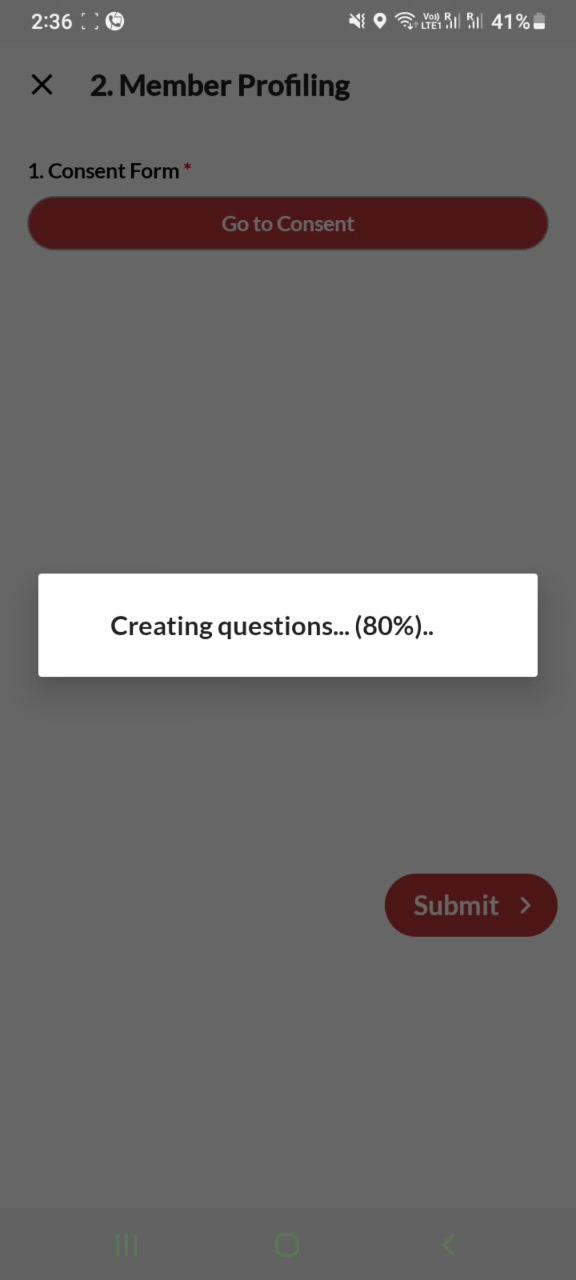
- Server-rendered. On open, a centred overlay reads
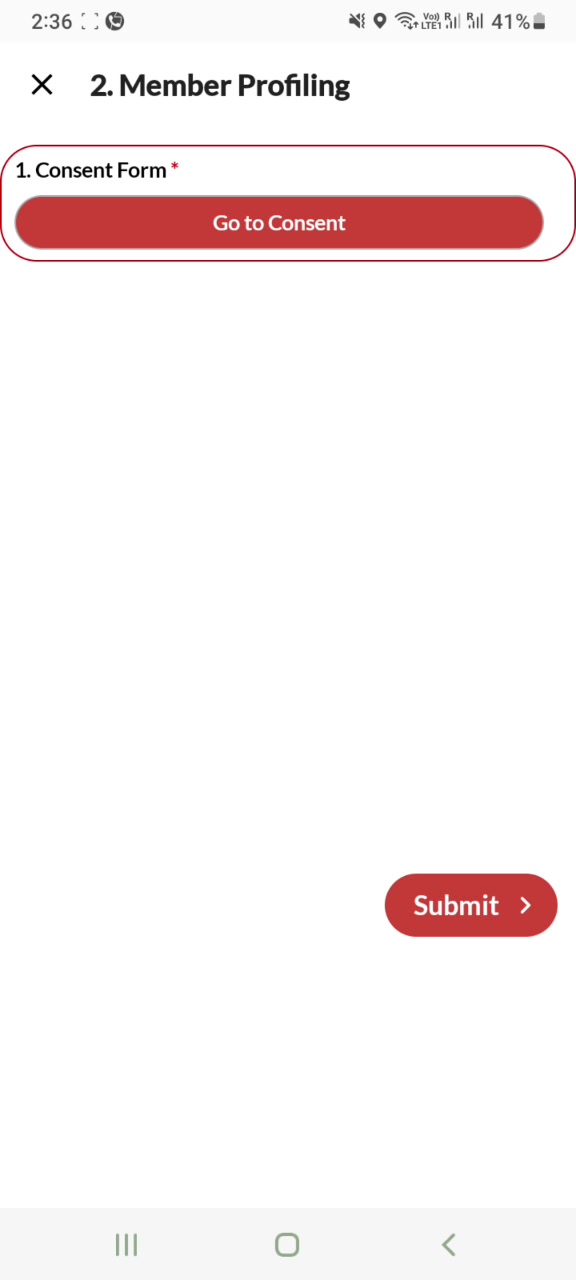
Creating questions... (NN%)..while the form is generated. Only field 1 is visible until then. - Consent gate at viewSeq 1. Field 1 (
Consent Form) is a button-style control. Until it equalsAgree, fields 2-N stay hidden AND the field shows a red outline. PM voiceover: “Go to consent, agree.” [00:54-00:59]. - One collapsible mid-form at viewSeq 33 (V2 order 20,
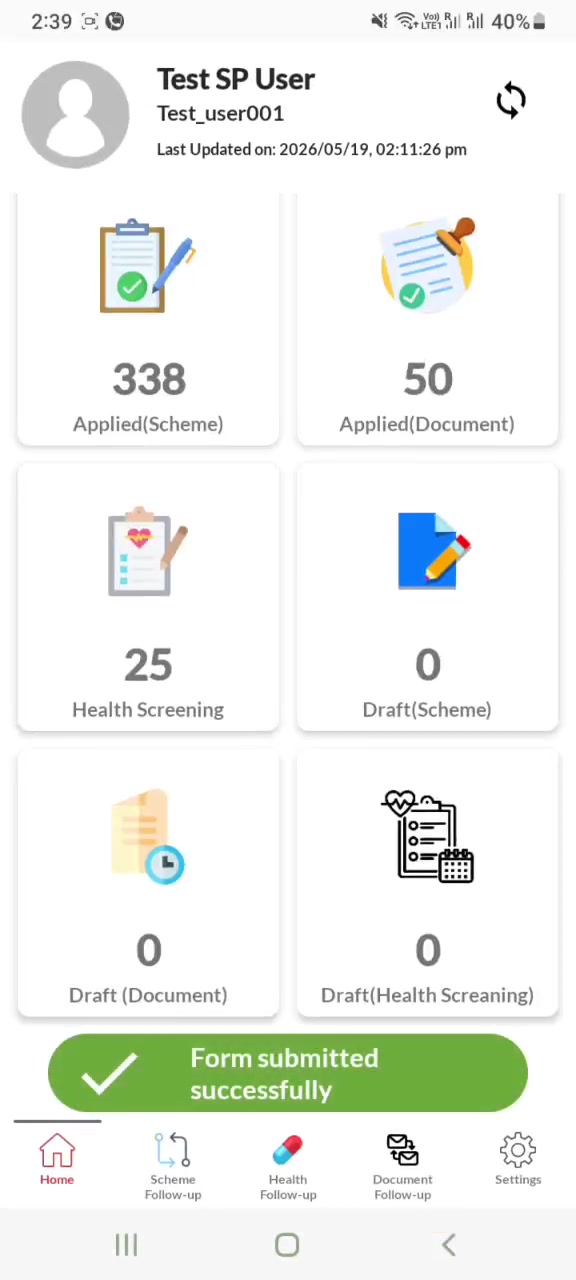
Additional Details), expanded by default. - One Submit button, red pill, bottom-right. Success banner inline:
✓ Form submitted successfully. - Top-left
Xto close. - Post-submit routing: the answer to viewSeq 31 (
Civic ID already present) determines which form opens next.No→ Document Application flow (“the document application forms… needs to be filled out”)Yes→ Scheme Application + Health Screening flow
Field-by-field (viewSequence order)
Render order matches V2 viewSequence. The V2 shortKey + order columns are for cross-referencing the JSON and the Frappe doctype fieldname. Conditional rule comes from V2 question.parent[] (skipping the consent-gate reference, which is form-level not field-level). All option lists and exact validation rules: read from raw/mform-forms/1000.json.
| Seq | Label (V2 title) | V2 shortKey (= Frappe fieldname) | V2 order | Conditional show-when | Notes |
|---|---|---|---|---|---|
| 1 | Consent Form | consent_form (mapped from order19) | 19 | always (it IS the gate) | Must equal Agree. Red outline until satisfied. Hides 2-N. Popup info text appears on open. |
| 2 | State | state | 1 | — | Auto-populated from logged-in user’s region (override allowed) |
| 3 | District | district | 2 | — | Cascade from state |
| 4 | Block | block | 3 | — | Cascade from district |
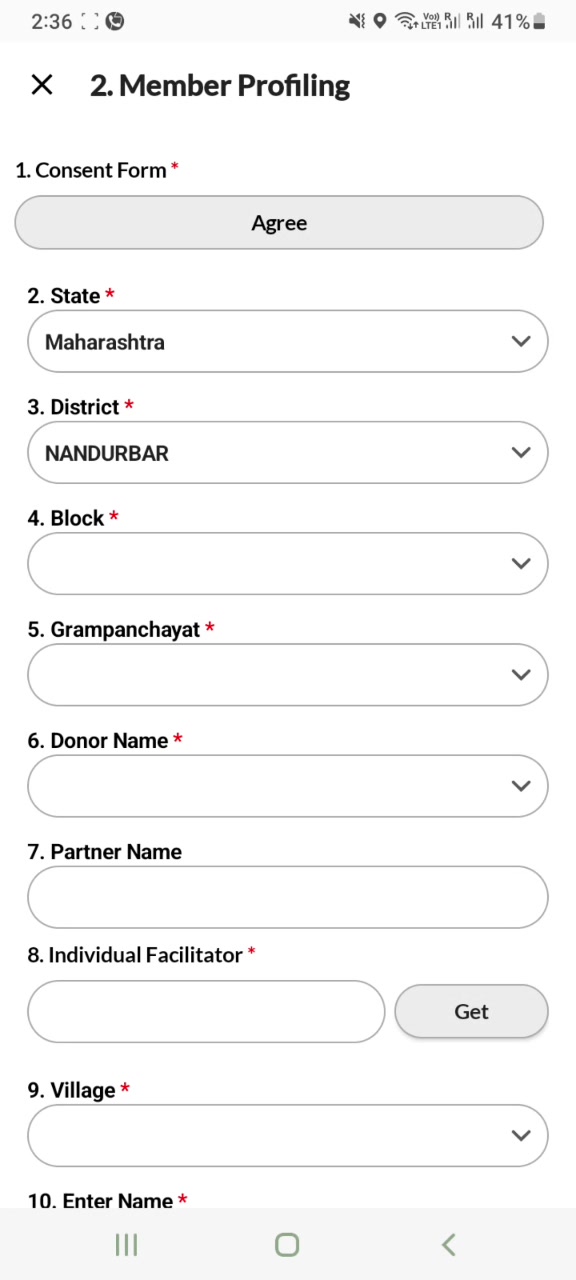
| 5 | Grampanchayat | gram_panchayat | 34 | — | Cascade from block. Triggers Donor/Partner auto-populate |
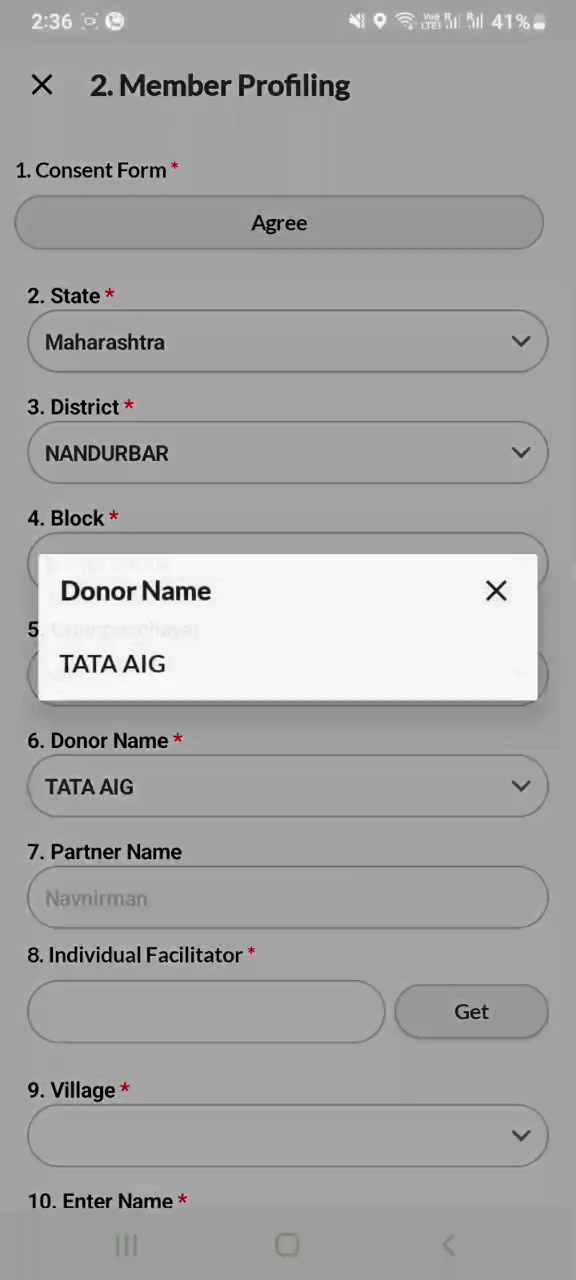
| 6 | Donor Name | name_donor | 36 | — | Auto-populated from Donor Master based on Grampanchayat; dropdown remains overridable |
| 7 | Partner Name | order38 | 38 | — | Auto-populated (gray placeholder); free-text input |
| 8 | Individual Facilitator | surveyor | 37 | — | Two-control: text input + Get button. Tapping Get populates the text with the logged-in user’s display name. Get disappears after population. |
| 9 | Village | village | 35 | — | Cascade from Grampanchayat |
| 10 | Enter Name | b_pro_name | 4 | — | Alphanumeric |
| 11 | Father’s/Spouse name of the member | order5 | 5 | — | Alphanumeric |
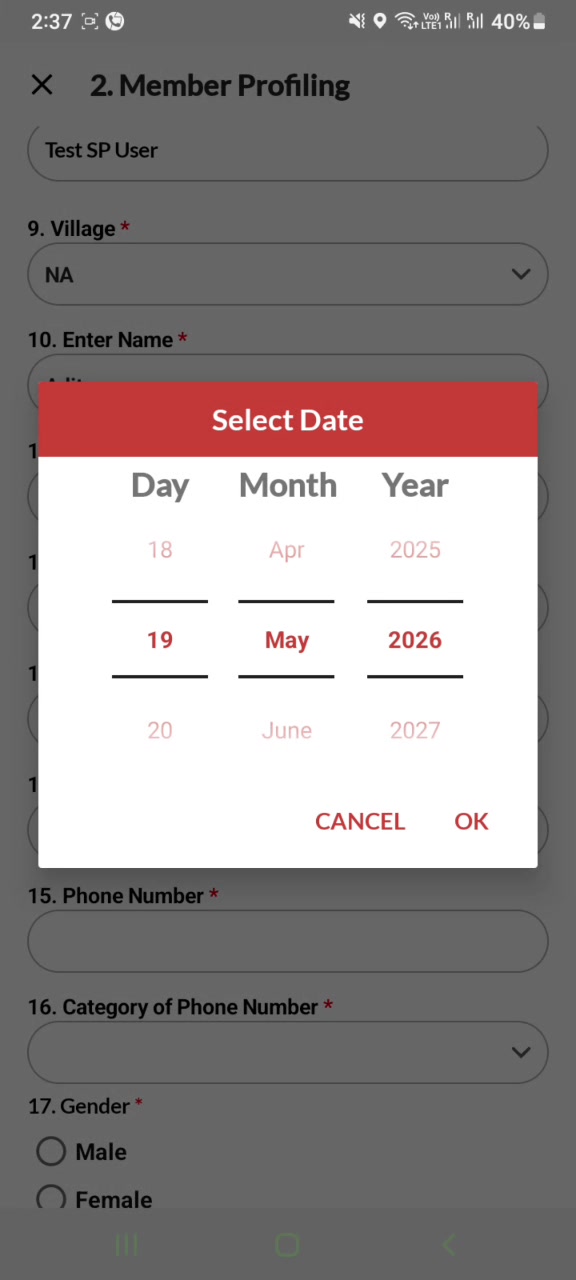
| 12 | Enter Date of Birth | b_prof_dob | 6 | — | Wheel-style 3-column picker (Day / Month / Year); displays DD-MM-YYYY; CANCEL / OK |
| 13 | Age | order32 | 32 | — | Auto-calculated from DOB. Read-only (gray). Range 0-130 (V2 raw says 0-200; tighter cap is policy — see feedback_swasti_age_max_130). |
| 14 | Address | order31 | 31 | — | Multi-line textarea |
| 15 | Phone Number | b_prof_mob | 7 | — | Numeric, 10-digit Indian mobile ^[6-9]\d{9}$ |
| 16 | Category of Phone Number | categ_phone | 43 | — | Self / Other (full list in V2 JSON) |
| 17 | Gender | b_prof_sex | 8 | — | Radio: Male / Female / Trans (V2 uses “Trans” not “Transgender”) |
| 18 | Number of members in the household | order63 | 63 | — | Numeric. Currently missing from our V3 implementation. |
| 19 | Education Qualification | order45 | 45 | — | Dropdown |
| 20 | Religion | b_prof_reli | 14 | — | Dropdown |
| 21 | Occupation Status | occup_status | 39 | — | Dropdown: Employed / Unemployed / Retired / Student / Homemaker (verify in V2 JSON) |
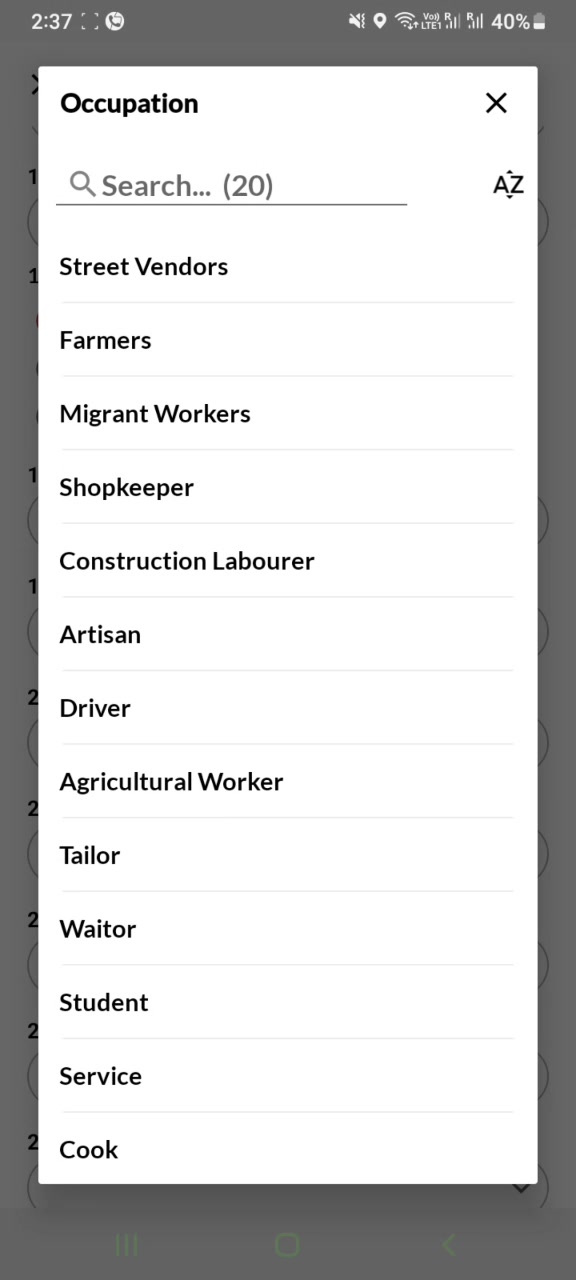
| 22 | Occupation | b_prof_occ | 11 | occup_status = Employed | Searchable picker (20 entries) with A-Z sort toggle. List in V2 JSON. |
| 23 | Please specify if selected “Other” | other_occupation | 41 | b_prof_occ = Other | Free text |
| 24 | Annual Income | b_prof_inc | 12 | — | Numeric, max 10 digits |
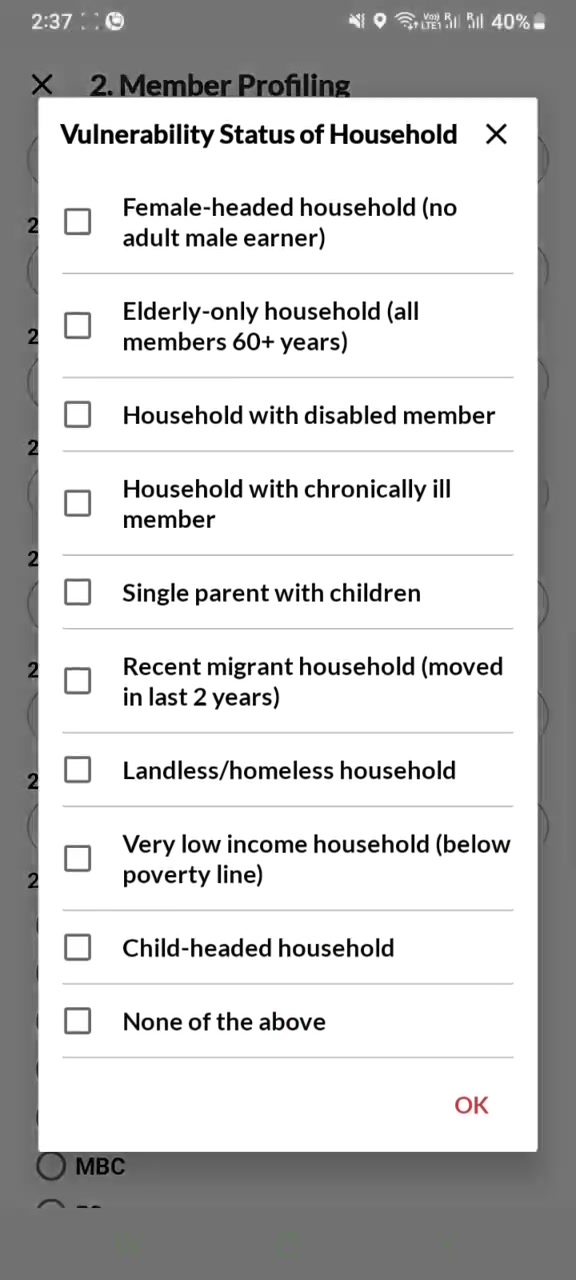
| 25 | Vulnerability Status of Household | order46 | 46 | — | Multi-select modal with checkboxes + OK button. 10 options (Female-headed, Elderly-only, Disabled-member, Chronically-ill, Single-parent, Recent-migrant, Landless, Below-poverty, Child-headed, None). |
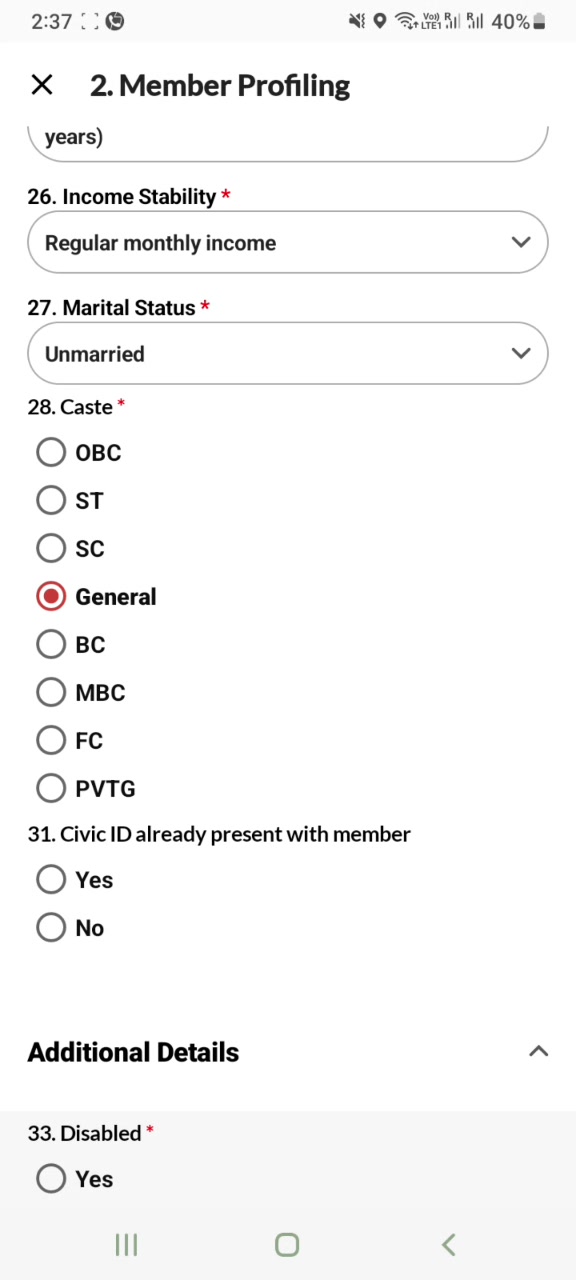
| 26 | Income Stability | order47 | 47 | — | Dropdown |
| 27 | Marital Status | order13 | 13 | — | Dropdown |
| 28 | Caste | order15 | 15 | — | Vertical radio: OBC, ST, SC, General, BC, MBC, FC, PVTG |
| 29 | Please specify if selected PVTG | other_pvtg | 40 | order15 = PVTG | Dropdown |
| 30 | Please specify if selected “Others” | others_pvtg | 42 | other_pvtg = Others | Free text |
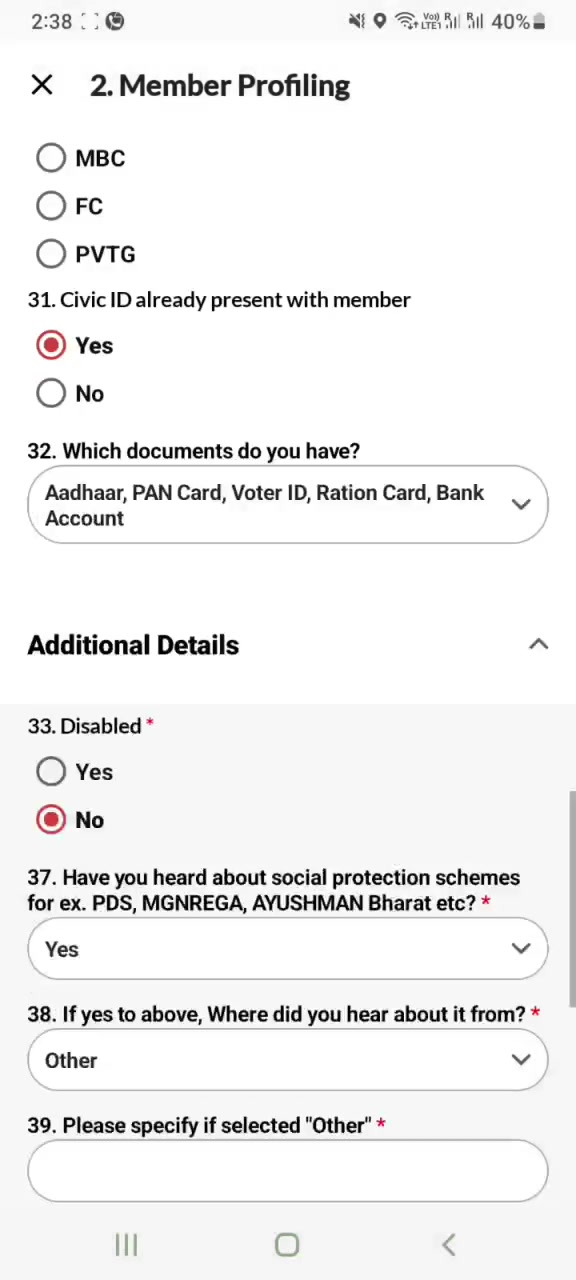
| 31 | Civic ID already present with member | order16 | 16 | — | Radio Yes/No. Drives post-submit routing. PM: “here comes the main question which is CV ID already present with the member.” [01:56-02:09] |
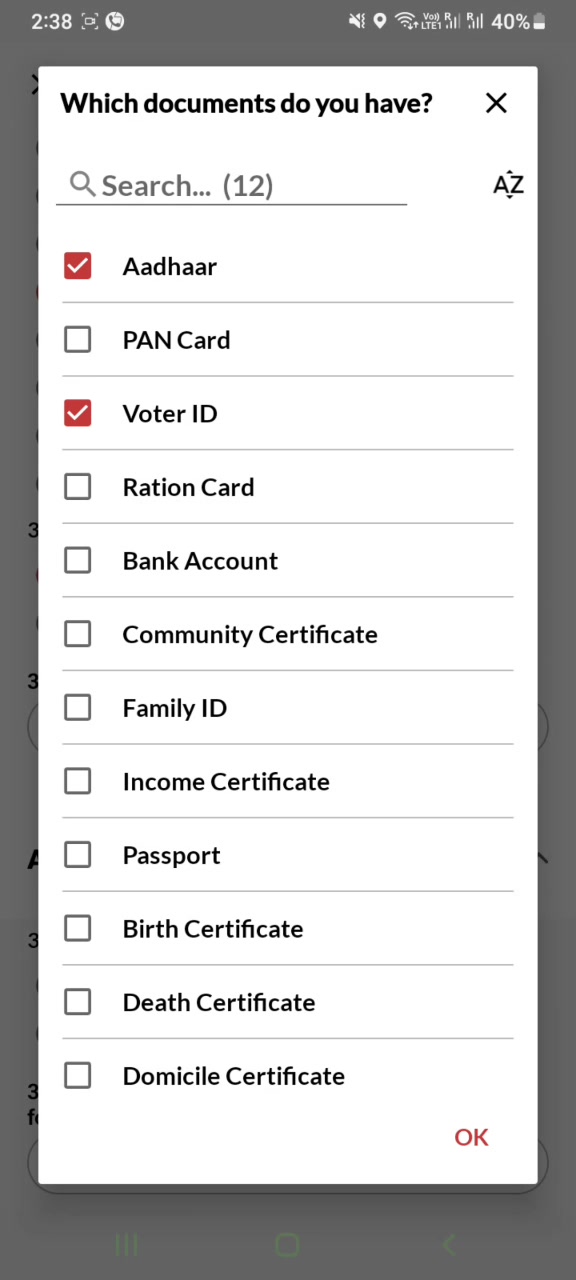
| 32 | Which documents do you have? | b_prof_doc | 18 | order16 = Yes | Searchable multi-select modal with 12 entries (Aadhaar, PAN Card, Voter ID, Ration Card, Bank Account, Community Certificate, Family ID, Income Certificate, Passport, Birth Certificate, Death Certificate, Domicile Certificate). |
| 33 | Additional Details (section header — collapsible, expanded by default) | order20 | 20 | — | V2 input type 22 (section header). Renders as collapsible group containing seq 34-48 below. |
| 34 | Disabled | order17 | 17 | — | Radio Yes/No |
| 35 | Type of Disability | order48 | 48 | order17 = Yes | Dropdown |
| 36 | Please specify if selected “Other” | order49 | 49 | order48 = Other | Free text |
| 37 | Please attach the Disability Certificate | order62 | 62 | order17 = Yes | File upload (Phase 6) |
| 38 | Have you heard about social protection schemes for ex. PDS, MGNREGA, AYUSHMAN Bharat etc? | order50 | 50 | — | Yes/No |
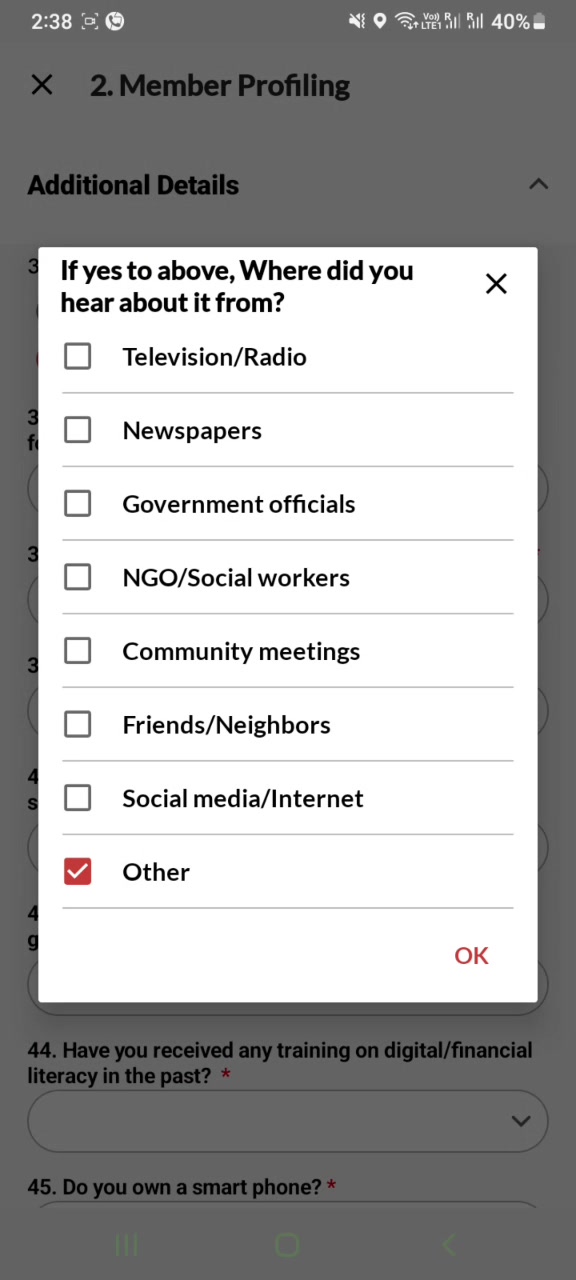
| 39 | If yes to above, Where did you hear about it from? | order51 | 51 | order50 = Yes | Multi-select modal. Options: Television/Radio, Newspapers, Government officials, NGO/Social workers, Community meetings, Friends/Neighbors, Social media/Internet, Other |
| 40 | Please specify if selected “Other” | order52 | 52 | order51 includes Other | Free text |
| 41 | Have you ever applied for any social protection scheme? | order53 | 53 | order50 = Yes | Yes/No |
| 42 | Did you receive the benefits after you applied? | order54 | 54 | order53 = Yes | Yes/No |
| 43 | What were the reasons? | order55 | 55 | order54 = No | Dropdown |
| 44 | Did you attend any Awareness Camps on government scheme in last 12 months? | order56 | 56 | — | Yes/No |
| 45 | Have you received any training on digital/financial literacy in the past? | order57 | 57 | — | Yes/No |
| 46 | Do you own a smart phone? | order58 | 58 | — | Yes/No |
| 47 | If YES to above, then - What is your level of comfort with using mobile phones and digital services? | order59 | 59 | order58 = Yes | Dropdown |
| 48 | What are your consistent challenges in access Government Schemes? (Multi-Select) | order60 | 60 | — | Multi-select. Label literally contains the string “(Multi-Select)”. Sample values from video: Required documents not available, Corruption/bribes demanded |
| 49 | Please specify if selected “Others” | order61 | 61 | order60 includes Others | Free text |
| 50 | If you want to store more IDs - select number here | order24 | 24 | — | Dropdown: 1 / 2 / 3 |
| 51 | Name of Other ID 1 | order25 | 25 | order24 ∈ {1, 2, 3} | Text |
| 52 | Upload Image for ID 1 | order28 | 28 | order24 ∈ {1, 2, 3} | File upload |
| 53 | Name of Other ID 2 | order26 | 26 | order24 ∈ {2, 3} | Text |
| 54 | Upload Image for ID 2 | order29 | 29 | order24 ∈ {2, 3} | File upload |
| 55 | Name of Other ID 3 | order27 | 27 | order24 = 3 | Text |
| 56 | Upload Image for ID 3 | order30 | 30 | order24 = 3 | File upload |
Note on placement of “more IDs” block: the video shows the “store more IDs” question at the bottom of the form (after the awareness/training/smartphone block) rather than alongside the main document multi-select. This matches V2 viewSequence 50-56. The doctype evals (
depends_on,mandatory_depends_on) already exist for these and behave correctly in Frappe.
Special behaviours (not in V2 JSON)
These are V2 production behaviours visible in the video but not encoded in the form JSON — they live in V2 backend code. We need to recreate them in V3.
1. Consent gate
- Field 1 is a “button”-style control, not the dropdown/radio our current implementation uses
- Tapping it opens a popup with consent text + Agree / Disagree buttons (mForm V2 production behaviour — exact wording to confirm with PM)
- Until
consent_form == 'Agree', fields 2-N stay hidden, and the consent control shows a red outline - Submit is blocked until consent is given
2. Auto-populate triggered by Grampanchayat
When viewSeq 5 (Grampanchayat) is selected:
- viewSeq 6 (
Donor Name) auto-fills from Donor Master, keyed by gram_panchayat - viewSeq 7 (
Partner Name) auto-fills (gray placeholder shows the populated value) - Both remain user-overridable
PM quote: “donor name or partner name are auto populated. These are the based on the gram banchan.” [01:02-01:09] · “this member profiling form is connected to donor master form.” [01:09-01:14]
Data source: Donor Master (V2) — we have the export at raw/mongo-export/donormasters.jsonl. Mapping: donormaster.gram_panchayat → donormaster.donor_name + .partner_name.
3. Individual Facilitator “Get” button
viewSeq 8 renders as [ text input ] [ Get ]. Tapping Get populates the text with the logged-in user’s display name (e.g. Test SP User). The Get button disappears once populated. Maps to Frappe surveyor (V2 order 37) which on our side is set to the logged-in user automatically — we already have this server-side, we just need the visible Get-button UI affordance to match the V2 UX.
4. Server-side schema generation (loader)
V2 production renders a Creating questions... (NN%).. overlay while the form schema is fetched. Our V3 has the manifest baked into the client (faster) — we should still show a brief skeleton loader on form open to match the perceived behaviour, even though the schema is local.
5. Post-submit routing
The Civic ID answer (order16) determines what opens next:
No→ Document Application form (user is missing IDs, needs to apply)Yes→ Scheme Application form + Health Screening form (user has IDs, ready for benefit enrollment)
PM quote: “If we select no… the document application forms… needs to be filled out.” [02:09-02:24] · “When I click on yes the scheme application and then screening are filled up.” [03:13-03:18]
Implementation: on successful Member save, branch on the just-submitted order16 value to push the appropriate next-form route.
Gap vs current V3 Flutter implementation
| Area | Current V3 (May 19) | Should be (per video) |
|---|---|---|
| Layout | 7 paged sections with Continue buttons | One scroll. One Additional Details collapsible at viewSeq 33. |
| Field order | By V2 order (question ID) | By V2 viewSequence |
| Consent placement | Last step (we moved it after PM ask earlier today) | Field 1, top. With popup text + Agree/Disagree, red outline gate. |
| Donor auto-populate | Manual picker | Auto-fill on Grampanchayat select; overridable |
| Partner auto-populate | Not present | Auto-fill on Grampanchayat select; overridable |
| Individual Facilitator field | Not rendered (server-side surveyor only) | Rendered with Get button |
order63 Number of household members | Not rendered | Number input at viewSeq 18 |
| Field labels | Paraphrased (“Full name”) | Verbatim (“Enter Name”, “Father’s/Spouse name of the member”, etc.) |
| Gender option | Transgender | Trans |
| Caste options | Need to verify against V2 verbatim | OBC, ST, SC, General, BC, MBC, FC, PVTG |
| Vulnerability picker | Plain checkbox list (verify) | Modal with checkboxes + OK button |
| Occupation picker | Plain dropdown | Searchable picker with A-Z sort, “(20)” count badge |
| Documents picker | Plain checkbox list | Searchable modal, “(12)” count badge |
| Submit success feedback | Returns to list | Green inline banner ✓ Form submitted successfully on home dashboard above bottom tab |
| Post-submit next form | None | Branch on order16 → Document Application or Scheme + Health |
What we KEEP unchanged from the current V3
FormValidationSpec+ reactivevisibleWhen/requiredWhenevaluator (FX5)- FX4 audit + FX5 codegen →
kFormValidationSpecs - Frappe
Memberdoctype +member.pyserver validators - Offline-first SDK, outbox, sync (
syncAll, REST push) - Login + Member-list + Member-detail screens (only the ADD/EDIT screen changes)
Open items to confirm with PM
- Exact consent popup wording — the video shows the popup briefly but resolution doesn’t allow verbatim capture
- Caste option order in V2 JSON vs video (some labels were not enumerated in the picker on camera)
- Education / Religion / Occupation Status / Income Stability / Marital Status full option lists (pickers never opened on camera; V2 JSON should suffice)
- Whether Donor Master cascade keys on
gram_panchayatID or label - Whether
Geton Individual Facilitator should also populate when re-opening a draft (yes/no) - Whether post-submit “Scheme + Health” means both open or a chooser is shown
Source files
- PM video:
/Users/abhijitnair/Downloads/Video 1 from SharePoint.mp4(7:58) - Structured spec:
pm-spec/2026-05-19/SPEC.md(473 lines, all 5 forms) - Screenshots (Form 1, 22 frames):
pm-spec/2026-05-19/screenshots/f1_*.jpg - V2 form JSON:
raw/mform-forms/1000.json(56 questions) - V2 viewSequence dump:
audit/out/member_view_order.json
This note is the authority. Subsequent PM videos for Scheme Application, Scheme Followup, Document Application, and Document Application Followup will become notes 12-15.