12 — Health Screening authoritative flow (PM video)
Authority: PM Fahim’s voiceover walkthrough of mForm V2 production, recorded 2026-05-19 (“Video 2.mp4”, ~18 min, 167 segments). This note is the canonical Health Screening spec going forward. When this contradicts the V2 form JSON (forms 1010 / 1011), the video wins for surveyor-facing UX and field order. When the video doesn’t state a specific threshold, the HS_Logics sheet (
raw/pm-design/extracted/HS_Logics.md) wins for numeric values. The V2 JSON fills in option lists only.
Program context
Health Screening is one of the core programs Swasti runs. It sits immediately after Member Profiling in the lifecycle: once a member is profiled, a field worker opens the Health Screening form for that member.
The program has a structured follow-up lifecycle:
Initial Screening (5.1)
    └── if any marker abnormal → Follow-up 1 (5.2, visit 1)  [~15 days later]
            └── if still abnormal → Follow-up 2 (5.2, visit 2)
                    └── optional → Follow-up 3 (5.2, visit 3 or 4)
                            └── Re-screening (5.2, final visit)
                                    └── workflow closes
    └── if all markers normal → workflow closes immediately
“There are technically three follow-ups and the fourth one is the rescreen, so there are total four follow-ups.” — PM Fahim [00:50–00:57]
The V2 system had two separate forms: form 1010 (initial screening) and form 1011 (follow-up). V3 folds both into one Health Screening doctype (health_screening), distinguished by visit_number:
visit_number = 1→ initial screeningvisit_number = 2, 3, 4→ follow-up visits (numbers go up if a follow-up couldn’t be completed in one visit)visit_number = 5(or final) → re-screening
Entry point and auto-population
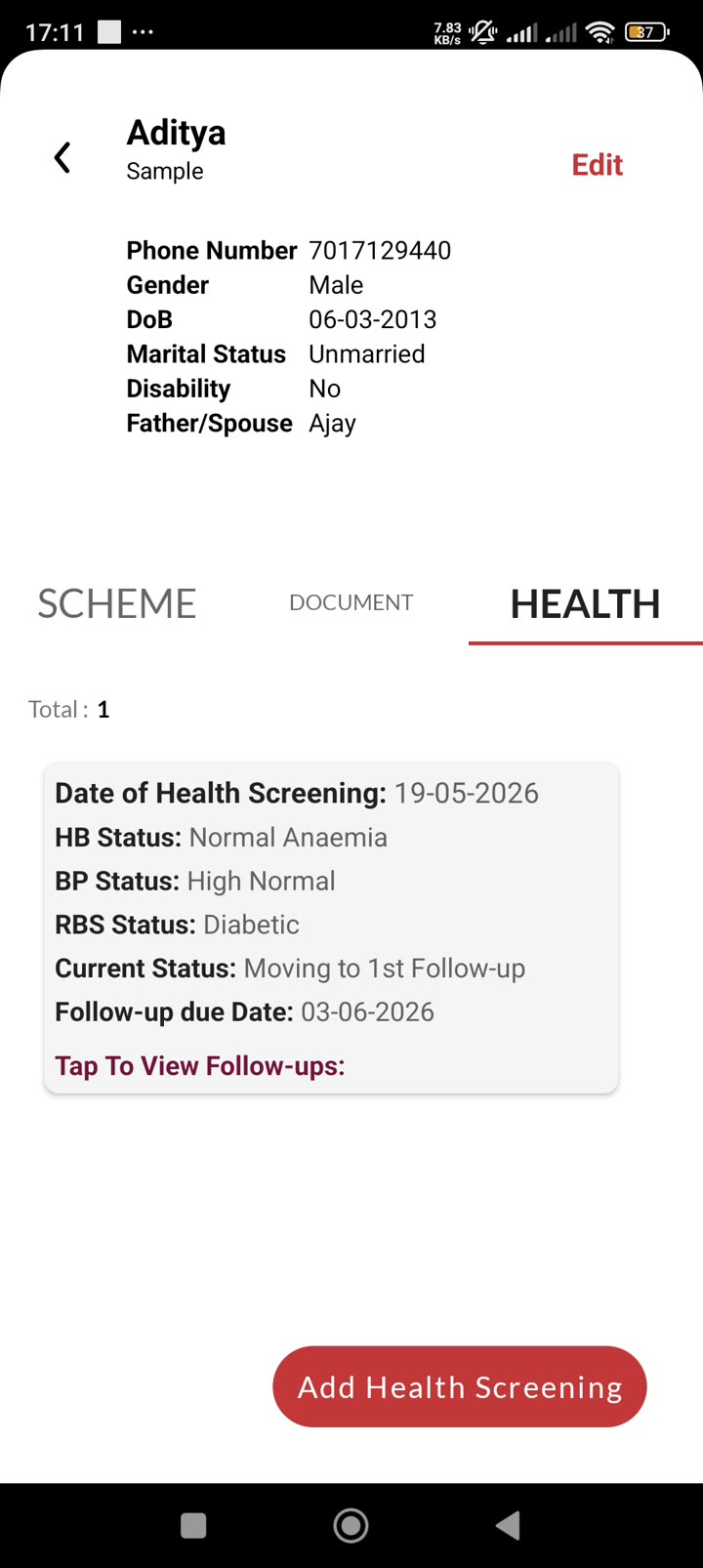
The surveyor navigates to the member’s detail page and taps the Health tab. If no screening exists, the tab shows an “Add Health Screening” button. Tapping it opens the 5.1 Health Screening form.
“Once a member is created and profiled we move to the health section here, when we click on the add health screening the health screening form automatically opens.” — Fahim [01:06–01:11]
Auto-population on open:
- Question 6 (Member Details) uses a dynamic option that pulls
name + phone numberfor the identifier. The surveyor selects the member from this dropdown; selecting it triggers population of the remaining pre-filled fields. - Geography (State → District → Block → Grampanchayat → Village) all cascade and auto-fill from the logged-in user’s context / the member record.
- Demographics (Gender, Date of Birth, Age, Age in months, Marital Status, Disabled, Pregnant) are pre-populated from the Member profile — the surveyor does not re-enter these.
- Date of Health Screening defaults to today.
“Few of the details are automatically imported which are not to be selected from the user.” — Fahim [01:23–01:29]
Form structure (Initial Screening — visit_number = 1)
The initial screening form renders as one vertical scroll. Sections are collapsible but most are expanded by default. Field sequence follows V2 viewSequence order.
Section 1 — Member details (pre-filled, read-only)
All fields in this section are auto-populated from the member profile. The surveyor cannot edit them here.
| Field | Doctype fieldname | Type | Mandatory | Notes |
|---|---|---|---|---|
| State | state | Link | Yes | From user context |
| District | district | Link | Yes | Cascades from state |
| Block | block | Link | Yes | Cascades from district |
| Grampanchayat | gram_panchayat | Link | Yes | Cascades from block |
| Village | village | Link | Yes | Cascades from GP |
| Member | member | Link | Yes | Q6 — dynamic option showing name + phone |
| Gender | gender | Select | Yes | Pre-filled from member |
| Date of Birth | date_of_birth | Date | Yes | Pre-filled from member |
| Age | age | Float | Yes | Pre-filled from member |
| Age in months | age_months | Float | Yes | Used for child/adolescent BMI Z-score |
| Marital Status | marital_status | Select | Yes | Pre-filled from member |
| Disabled | disabled | Select | Yes | Pre-filled from member |
| Pregnant | pregnant | Select | Yes | Visible only if Gender = Female |
| Date of Health Screening | date_health_screening | Date | Yes | Defaults to today |
| Blood Group | blood_group | Select | No | Surveyor enters; non-mandatory |
Section 2 — BMI Details
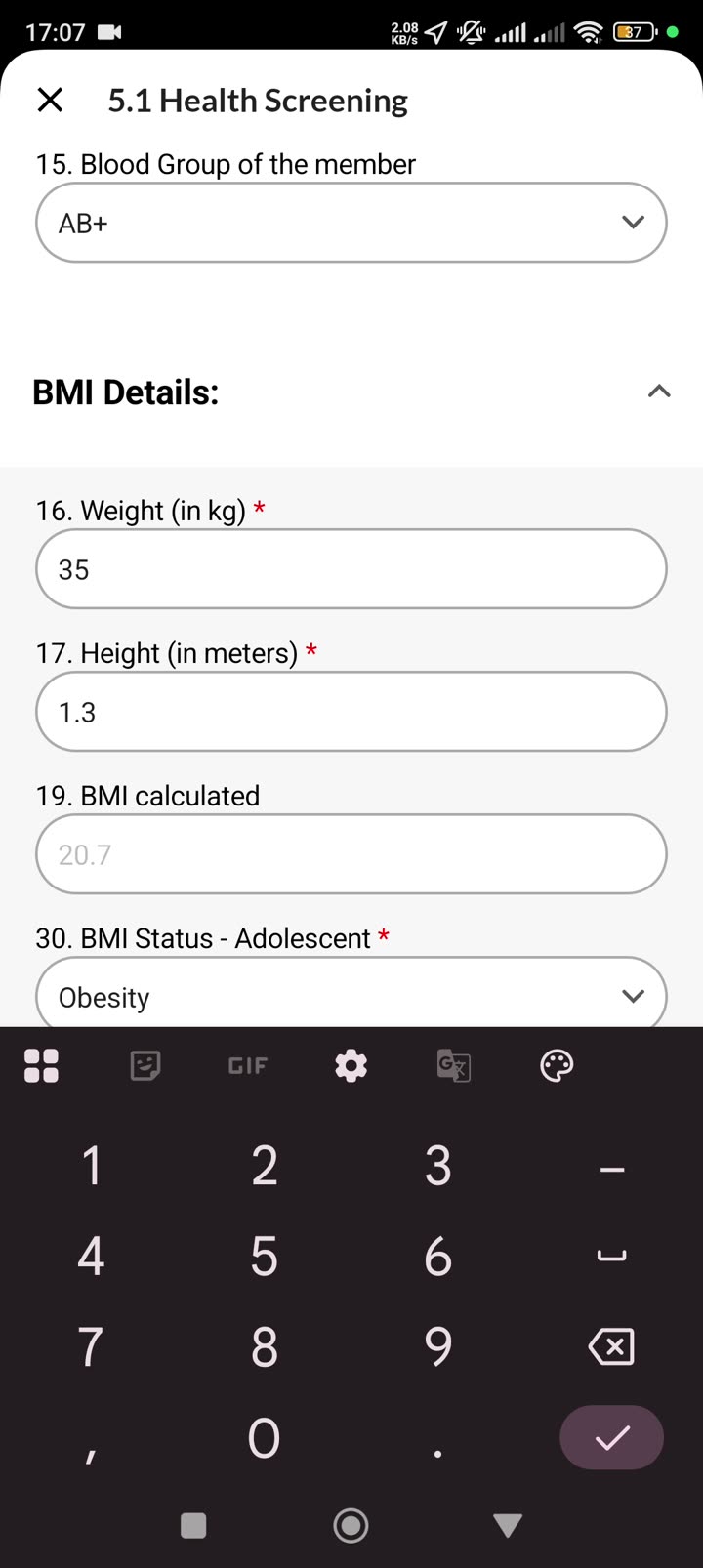
“Here we capture the weight, height, and BMI is automatically calculated.” — Fahim [02:19–02:25]
| Field | Doctype fieldname | Type | Mandatory | Notes |
|---|---|---|---|---|
| Weight (in kg) | weight_kg | Float | Yes | Range 0–160, 2 decimal places |
| Height (in meters) | height_meters | Float | Yes | Range 0.1–2.5, 2 decimal places |
| Height in cm | height_cm | Float | Auto | Derived from height_meters × 100 |
| BMI calculated | bmi_calculated | Float | Auto | weight_kg / height_meters² |
| BMI Status — Adult | bmi_status_adult | Select | Auto | Set if age ≥ 18 |
| BMI Status — Child | bmi_status_child | Select | Auto | Set if age 0–5 (weight-for-height Z-score) |
| BMI Status — Adolescent | bmi_status_adolescent | Select | Auto | Set if age 5–18 (BMI-for-age Z-score, WHO) |
| SD scores (WFH/WFA) | sd_minus2_wfh, sd_plus2_wfh, sd_minus2_wfa, sd_plus2_wfa | Float | Auto | Z-score reference values for child band |
| BMI Interpretation | in_underweight … in_severe_obesity | HTML | Auto | Inline text shown based on status; one active at a time |
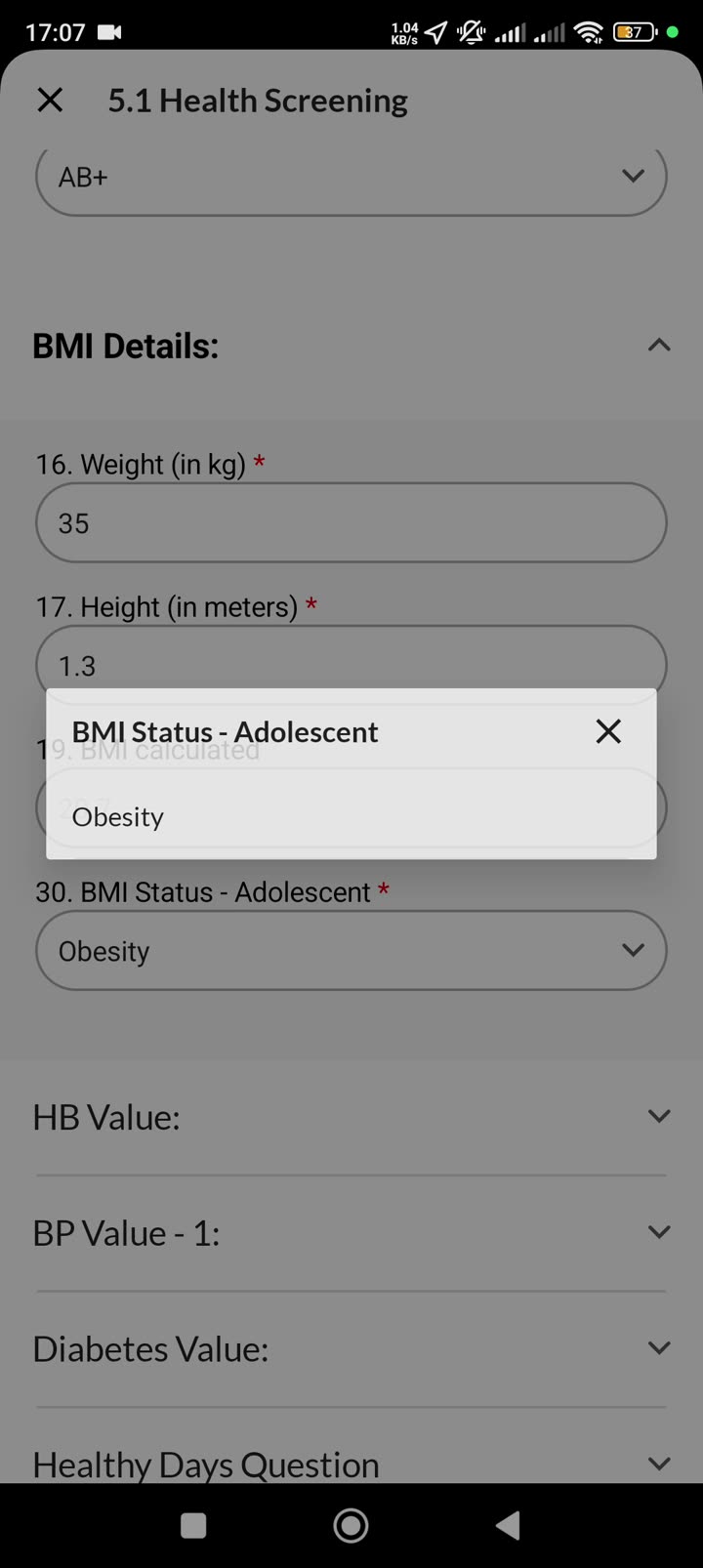
“Since this is an adolescent kid, the BMI status based on Z-score is calculated as described by the World Health Organization. The member is classified as obese — this automatically comes.” — Fahim [03:45–04:04]
Section 3 — HB (Haemoglobin) Value
| Field | Doctype fieldname | Type | Mandatory | Notes |
|---|---|---|---|---|
| HB Value (in g/dL) | hb_value | Float | Yes | Range 0–20, 1 decimal place |
| HB Status | hb_status | Select | Yes | Auto-set from threshold table; options: Normal Anaemia / Mild Anaemia / Moderate Anaemia / Severe Anaemia / High Haemoglobin |
| HB Interpretation | in_normal_hb … in_high_hemoglobin | HTML | Auto | Inline explanation text |
“Now we move to the HB value — here we can give the HB value. The value is 14, which is in the normal range.” — Fahim [04:04–04:15]
Section 4 — BP Value 1 (First reading)
“If this is in abnormal range — for example, the status of the systolic pressure is severe high — which means [the surveyor should] pause the form for 30 minutes and save it as a draft, then reopen it and continue the form.” — Fahim [05:04–05:34]
If BP reading 1 shows an abnormal result, the surveyor is instructed to pause, wait 30 minutes, and re-take the reading before entering BP reading 2.
| Field | Doctype fieldname | Type | Mandatory | Notes |
|---|---|---|---|---|
| 1st BP — Systolic (SBP) | bp1_systolic | Int | Yes | Range 0–250 |
| 1st BP — Diastolic (DBP) | bp1_diastolic | Int | Yes | Range 60–110 |
| BP-1 Systolic Stage Status | bp1_systolic_stage | Select | Yes | Auto-calc from systolic stage logic |
| BP-1 Diastolic Stage Status | bp1_diastolic_stage | Select | Yes | Auto-calc from diastolic stage logic |
Section 5 — BP Value 2 (Second reading)
| Field | Doctype fieldname | Type | Mandatory | Notes |
|---|---|---|---|---|
| 2nd BP — Systolic (SBP) | bp2_systolic | Int | Yes | Range 0–250 |
| 2nd BP — Diastolic (DBP) | bp2_diastolic | Int | Yes | Range 60–110 |
| BP-2 Systolic Stage Status | bp2_systolic_stage | Select | Yes | Auto-calc |
| BP-2 Diastolic Stage Status | bp2_diastolic_stage | Select | Yes | Auto-calc |
| BP Status (final) | bp_status | Select | Yes | Cumulative across both readings |
| BP Interpretation | in_low_bp … in_severe_high_bp | HTML | Auto | Inline explanation |
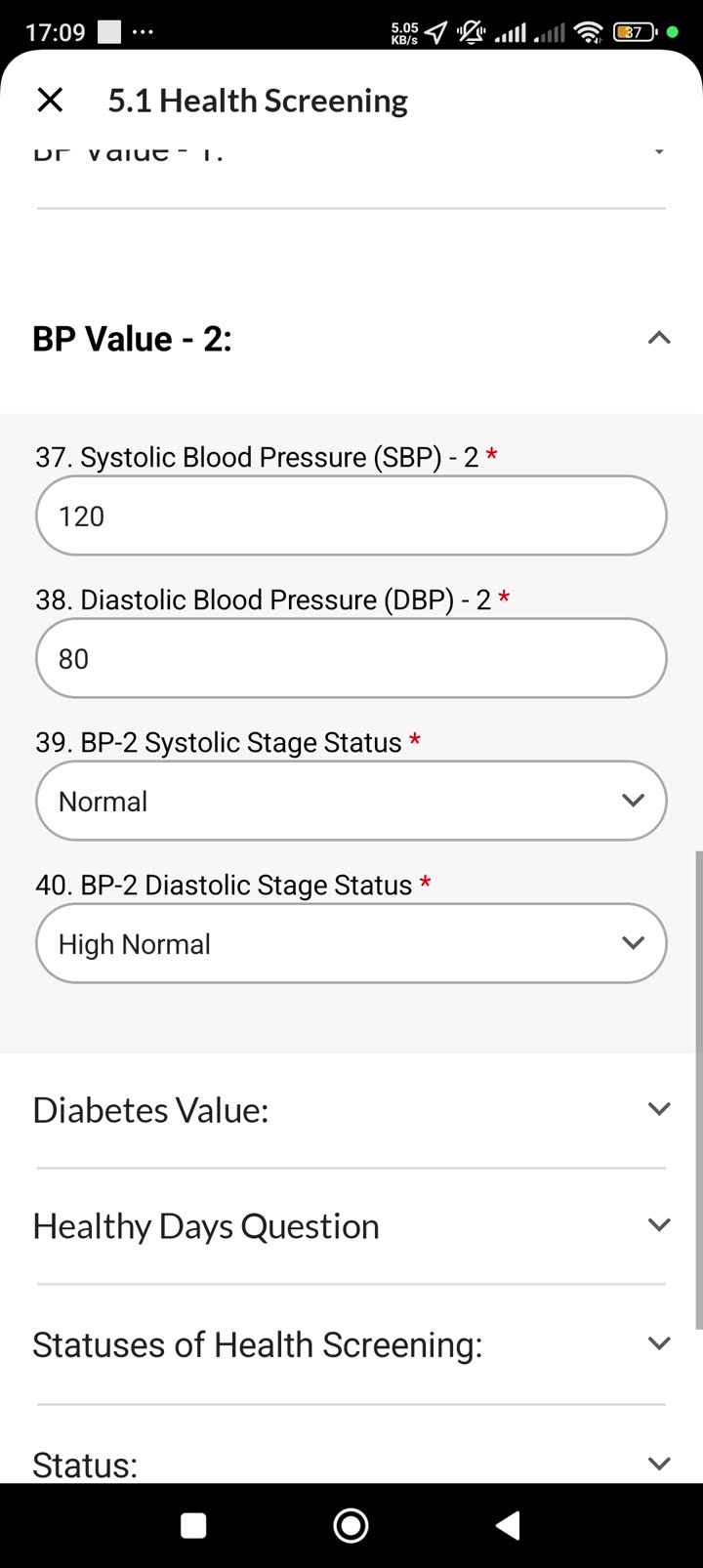
“The first time it was normal / high normal. Now if the member’s blood pressure has come as normal — it’s normal and high normal — and based on this, this is our second reading.” — Fahim [05:55–06:13]
Section 6 — Diabetes (Blood Sugar / RBS)
| Field | Doctype fieldname | Type | Mandatory | Notes |
|---|---|---|---|---|
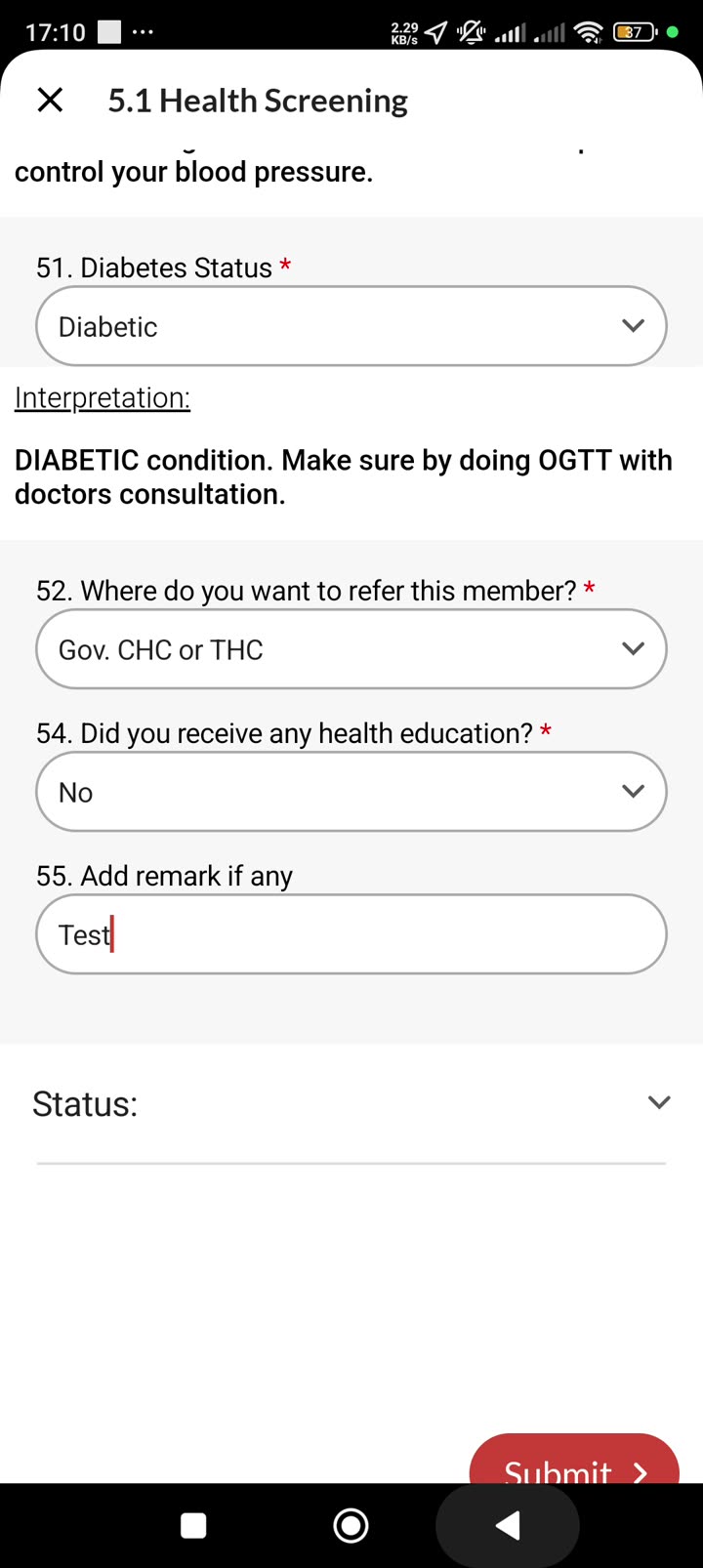
| Diabetes Level / RBS | diabetes_level_rbs | Float | Yes | Range 50–550, no decimal places |
| Diabetes Status | diabetes_status | Select | Yes | Auto-set; options: Low (Hypoglycemia) / Normal / PRE-Diabetic / Diabetic |
| Diabetes Interpretation | in_low_bs … in_diabetic | HTML | Auto | Inline explanation |
“After that we move to the diabetic status. It is coming as diabetic.” — Fahim [07:06–07:14]
Section 7 — Healthy Days Question
| Field | Doctype fieldname | Type | Mandatory | Notes |
|---|---|---|---|---|
| Physical health days | physical_health_days | Int | No | ”In the past 30 days, how many days did poor physical health keep you from usual activities?” |
| Mental health days | mental_health_days | Int | No | Same question for mental health |
These two fields are non-mandatory. The video does not explicitly walk through them; they appear in the section list.
Section 8 — Illness and Referral
| Field | Doctype fieldname | Type | Mandatory | Notes |
|---|---|---|---|---|
| Expresses Illness | express_illness | Table MultiSelect | Yes | Multi-select from Health Screening Expressed Illness Item child table |
| Specify if Others | illness_specify_others | Small Text | Conditional | Required if “Others” selected in express_illness |
| Where to refer this member? | referral | Select | Conditional | Required if any marker is abnormal (Hb, BP, or diabetes not Normal). Options: PHC / Gov. CHC or THC / Gov Hospital / Private Clinic / Private Hospital / Others |
| Specify referral if Others | referral_specify_others | Small Text | Conditional | Required if referral = Others |
| Did you receive any health education? | health_education | Select | Yes | Yes / No |
“After that we move to the diabetic status… there are the illnesses if there are any health [issues] we capture based on the values that we get in the field.” — Fahim [06:13–06:28]
Section 9 — Status
| Field | Doctype fieldname | Type | Mandatory | Notes |
|---|---|---|---|---|
| Remarks | remarks | Small Text | No | Surveyor notes |
| Final Score | status_final_score | Data | Auto | Internal roll-up score |
| Current Status | current_status | Select | Yes | ”Moving to 1st Follow-up” or “Health Status Normal (Workflow closed)“ |
| Follow-up Due Date | followup_due_date | Date | Auto | Set to today + 15 days if moving to follow-up |
| Workflow Status | workflow_status | Select | Auto | Draft / Screened / Referred / … |
“This is the final status. Since the health is not normal of this member, we are moving into the first follow-up. Follow-up happens first after 15 days, so due date for the first follow-up has been set.” — Fahim [07:14–07:28]
Eligibility logic by band
The thresholds below come from the HS_Logics sheet — these are the authoritative numeric cutoffs. The app computes statuses automatically; surveyors see only the result label and interpretation text.
BMI thresholds
Adults (age ≥ 18) — BMI in kg/m²
| Gender | BMI Range | Classification |
|---|---|---|
| Male | < 18.5 | Underweight |
| Male | 18.6 – 22.9 | Normal |
| Male | 23.0 – 24.9 | Overweight (At risk) |
| Male | 25.0 – 29.9 | Pre-Obese |
| Male | ≥ 30.0 | Obese |
| Female | < 18.5 | Underweight |
| Female | 18.6 – 22.9 | Normal |
| Female | 23.0 – 24.9 | Overweight (At risk) |
| Female | 25.0 – 29.9 | Pre-Obese |
| Female | ≥ 30.0 | Obese |
Children/Adolescents (age 5–18) — BMI-for-Age Z-Score (WHO SD)
| Z-Score | Classification |
|---|---|
| < −3 SD | Severe Thinness |
| −3 SD to < −2 SD | Thinness |
| −2 SD to +1 SD | Normal |
| > +1 SD to +2 SD | Overweight |
| > +2 SD | Obese |
“BMI for children from 0–5 and 5–10 as well as 10 above and for adults varies a lot. We use a concept of Z-score and therefore calculating those values.” — Fahim [17:29–17:51]
Children (age 0–5) — Weight-for-Height Z-Score
Uses WHO WFH tables; SD scores sd_minus2_wfh and sd_plus2_wfh stored for reference.
Haemoglobin thresholds (g/dL)
| Group | No Anaemia | Mild Anaemia | Moderate Anaemia | Severe Anaemia | High Haemoglobin |
|---|---|---|---|---|---|
| Children (0–14 yrs) M/F | ≥ 11.0 | 10.0 – 10.9 | 7.0 – 9.9 | < 7.0 | > 18.0 |
| Men (≥ 15 yrs) | ≥ 13.0 | 11.0 – 12.9 | 8.0 – 10.9 | < 8.0 | > 18.0 |
| Women (≥ 15 yrs) | ≥ 12.0 | 11.0 – 11.9 | 8.0 – 10.9 | < 8.0 | > 18.0 |
| Pregnant (any age) | ≥ 11.0 | 10.0 – 10.9 | 7.0 – 9.9 | < 7.0 | > 18.0 |
Blood Pressure thresholds (mmHg) — applies to age ≥ 13, all genders
Final bp_status is the higher of systolic stage and diastolic stage across both readings.
Systolic stage logic
| Stage | Systolic Range |
|---|---|
| Low | ≤ 80 |
| Normal | 90 – 129 |
| High Normal | 130 – 139 |
| Slightly High | 140 – 159 |
| Moderate High | 160 – 179 |
| Severe High | ≥ 180 |
Diastolic stage logic
| Stage | Diastolic Range |
|---|---|
| Low | ≤ 59 |
| Normal | 60 – 79 |
| High Normal | 80 – 89 |
| Slightly High | 90 – 99 |
| Moderate High | 100 – 109 |
| Severe High | ≥ 110 |
BP Status — combined label (used in bp_status field)
| Combined classification | bp_status value |
|---|---|
| Low (both readings Low) | Low |
| Normal | Normal |
| High Normal | High Normal |
| Slightly High | Slightly High |
| Moderate High | Moderate High |
| Severe High | Severe High |
Note: members under age 13 get
bp_status = "NA as the member's age is less than 13".
Blood Sugar (RBS, mg/dL) — all age groups
| Range | Status |
|---|---|
| < 70 | Low (Hypoglycemia) |
| 70 – 139 | Normal |
| 140 – 199 | PRE-Diabetic |
| ≥ 200 | Diabetic |
Final status and workflow
Current Status options (initial screening)
current_status value | Meaning |
|---|---|
Health Status Normal (Workflow closed) | All markers are Normal — no follow-up needed, case closes |
Moving to 1st Follow-up | At least one marker is abnormal — follow-up cycle begins |
Closure rule at initial screening
“The cumulative final status — based on which we either move the member to the health screening follow-up stage or the workflow closes here if the member has a normal health status.” — Fahim [02:02–02:19]
If all of the following are true, the workflow closes immediately:
- HB status = Normal (No Anaemia)
- BP status = Normal or Low
- Diabetes status = Normal
If any marker is outside normal range, current_status = "Moving to 1st Follow-up" and followup_due_date = today + 15 days.
Follow-up flow (form 1011, folded into visit_number 2+)
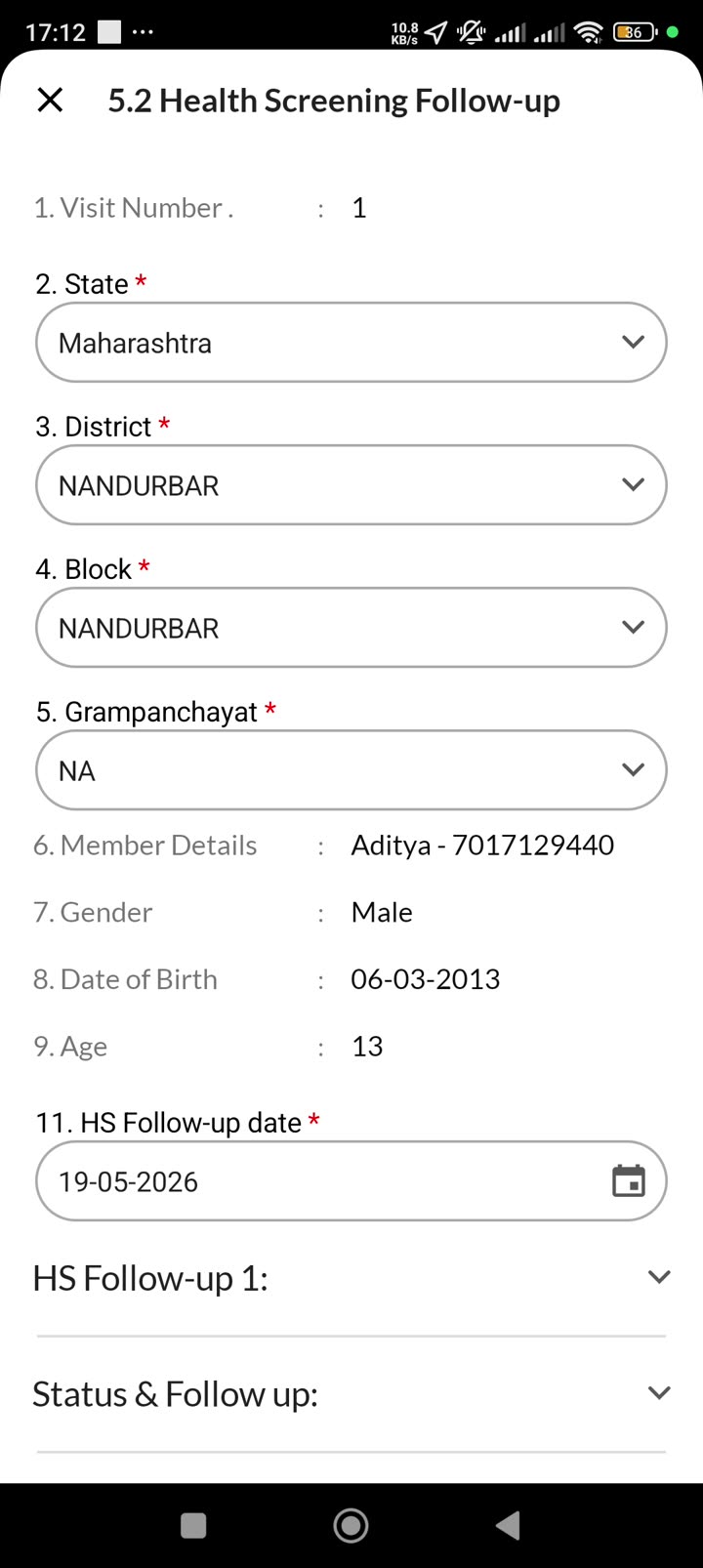
The follow-up form is titled 5.2 Health Screening Follow-up in V2. In V3 it uses the same health_screening doctype with visit_number incrementing.
“Visit number 1, 2, 3… Since the first follow-up didn’t happen in one visit, it happened in two visits, so the visit number is now four.” — Fahim [08:36–14:48]
Follow-up form structure
| Field group | Fields | Notes |
|---|---|---|
| Auto-populated | Geography (State → Village), Member Details, visit_number | Carry over from initial screening |
hsf_followup_date | Date | Current visit date; defaults to today |
| Previous follow-up status | fu_current_status of prior visit | Shown from visit 2 onward; hidden on visit 1 |
| Follow-up 1 section (HS Follow-up 1) | fu_counselling_provided, fu_health_edu_nurse, referral-center visit questions | Did member visit referral centre? Did screening happen there? If not, reason for failure |
| Status of Follow-up 1 | fu_rescreening_hb_status, fu_rescreening_bp_status, fu_rescreening_diabetes_status | Auto-set if screening happened; otherwise carried from last successful reading |
fu_current_status | Select | Status label for this visit |
“Since this is the visit number two, this ‘previous follow-up status’ will not come for visit number one, but it will start coming from visit number two because there’s a precursor.” — Fahim [10:23–10:33]
Follow-up 1 (visit 1) — key questions
- Did the member visit the referral centre (government hospital / PHC)?
- If yes: was the screening completed there?
- If no → reason (e.g., “lab facility not available”)
- If yes → record HB, BP, RBS values from the referral centre
Follow-up statuses
| Status label | Meaning |
|---|---|
| Member visited the referral centre but screening not completed | FU1 visit happened; lab couldn’t do it — eligible for another visit |
| Member under medication and moving to 2nd follow-up | FU1 complete; member on meds; needs FU2 |
| Member under medication and 2nd follow-up completed | FU2 done; surveyor can skip to rescreen or proceed to FU3 |
| Moving to 3rd follow-up | FU2 complete, 3rd follow-up selected |
| Member under medication and 3rd follow-up completed | FU3 done; moves to rescreen |
| Member under medication and managing | Final rescreen — all readings now in acceptable range |
Follow-up 2 and 3 — what’s different
“In the second follow-up we don’t capture any value or reading — we don’t capture it at all.” — Fahim [13:04–13:12]
Follow-up 2 and 3 focus on:
- Is the member taking medication regularly?
- Side effects experienced (multi-select)
- Refer to doctor again?
- Diet plan provided?
- Health education session conducted?
- “Do you want to do a 3rd follow-up?” (Yes/No) — this gates whether FU3 opens
“Also here there’s an option that if you don’t want to do a third follow-up, click on No and the status is ‘member is under medication and second follow-up completed’ — and the member will directly move to rescreening.” — Fahim [13:20–13:46]
Due date for each follow-up = 15 days from the current visit date.
Re-screening (final visit)
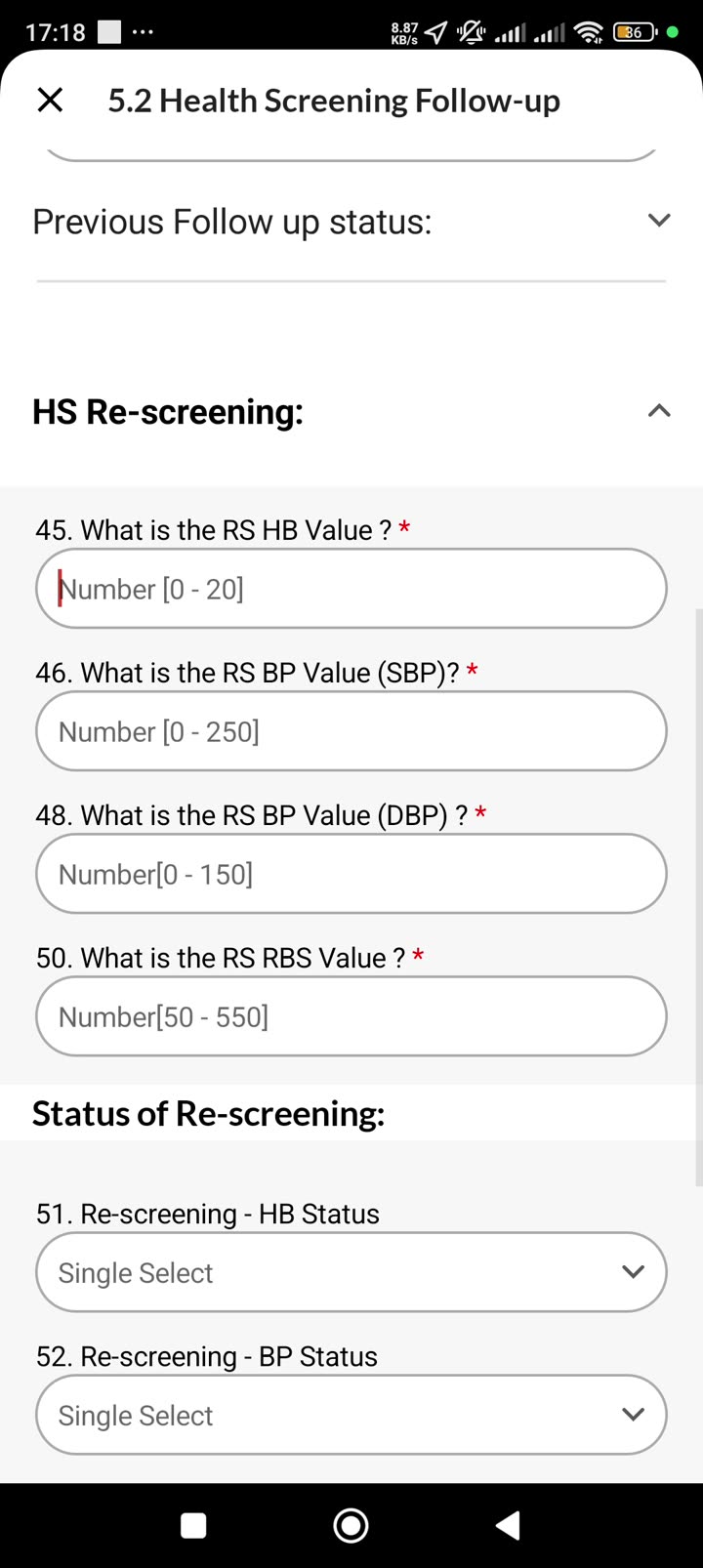
Re-screening opens after third follow-up is completed. It re-captures HB, BP (SBP + DBP), and RBS values just like the initial screening, then sets a final status.
“In the re-screening we capture the values like we captured in follow-up 1. We don’t capture the readings in follow-up 2 and 3, but here we calculate again.” — Fahim [15:18–15:30]
| Field | Doctype fieldname | Notes |
|---|---|---|
| RS HB Value | fu_rescreening_hb_status | 0–20 g/dL |
| RS BP (SBP) | re-screening SBP field | 0–250 mmHg |
| RS BP (DBP) | re-screening DBP field | 0–150 mmHg |
| RS RBS | re-screening RBS field | 50–550 mg/dL |
| Re-screening HB Status | auto | Set from threshold table |
| Re-screening BP Status | auto | Set from threshold table |
| Re-screening Diabetes Status | auto | Set from threshold table |
| Final current_status | fu_current_status | e.g. “Member under medication and managing” |
After rescreen is submitted, no further follow-up is allowed — the workflow closes permanently.
“Since there’s no further follow-up happening, the workflow closes here once I submit this.” — Fahim [16:23–16:31]
Gap analysis vs current doctype
The doctype JSON at frappe-bench-swasti/apps/mform_swasti/mform_swasti/health/doctype/health_screening/health_screening.json is the implementation baseline. Gaps identified below are action items for the build team — the doctype should not be changed without a separate review.
| # | Type | Description |
|---|---|---|
| 1 | MISSING | ”Do you want a 3rd follow-up?” gate field — the video shows an explicit Yes/No question in FU2 that determines whether FU3 is created. This is not in the current doctype field list as a standalone field. The fu_current_status captures the outcome but not the surveyor’s explicit choice. |
| 2 | MISSING | Follow-up 2 and 3 medication/diet/education fields — FU2 captures: “Is member on medication?”, “Side effects?” (multi-select), “Diet plan provided?”, “Health education session?”. None of these appear as named fields in the doctype. fu_counselling_provided and fu_health_edu_nurse partially cover this but are not comprehensive. |
| 3 | MISSING | Re-screening raw value fields — fu_rescreening_hb_status, fu_rescreening_bp_status, and fu_rescreening_diabetes_status store the status labels but the video shows numeric inputs for RS HB Value, RS SBP, RS DBP, and RS RBS first. The actual measurement values are not stored as separate fields in the current doctype. |
| 4 | MISSING | ”Reason referral could not be completed” field — in FU1, if the member visited the referral centre but screening wasn’t done, the surveyor selects a reason (e.g., “lab facility not available”). This reason field is not in the current doctype. |
| 5 | CONFIGURABLE | BP age threshold for “NA” status — currently hard-coded in the doctype bp_status options as “NA as the member’s age is less than 13”. The HS_Logics sheet confirms the threshold is 13. This should stay as-is but must be documented for future audits. |
| 6 | EXTRA | status_final_score — a data field in the doctype. The video never references a numeric score, only a cumulative status label. Purpose and calculation rule need to be confirmed with PM. |
| 7 | CONFIGURABLE | BMI adult vs adolescent routing logic — the doctype has three BMI status fields (bmi_status_adult, bmi_status_child, bmi_status_adolescent). The routing rule (which field to populate based on age) is not documented. Fahim confirmed Z-score for ages 5–18, WFH for 0–5, standard BMI for ≥ 18. The exact age boundary at 18 needs to be confirmed — is an 18-year-old “adult” or “adolescent”? |
| 8 | MISSING | Expressed illness child table contents — express_illness links to “Health Screening Expressed Illness Item” child table. The list of illness options is not in the main doctype JSON and its V2 source has not been mapped. |
Open items for PM (Fahim)
status_final_scorefield — what does this store? Is it a numeric composite of the four marker statuses, or something else? Is it displayed to the surveyor?- BMI age boundary at 18 — is a member aged exactly 18 classified as adult (kg/m²) or adolescent (Z-score)? The doctype has both fields; which one takes priority at 18?
- “Do you want 3rd follow-up?” as a standalone field — should this be added as an explicit Yes/No field in the doctype, or is it implied by the surveyor’s
fu_current_statusselection? - Follow-up 2 and 3 sub-fields — confirm the complete list: medication adherence (Yes/No), side effects (which multi-select options?), diet plan (Yes/No), health education session (Yes/No). Are these all mandatory?
- Re-screening raw values — should RS HB Value, RS SBP, RS DBP, and RS RBS be stored as numeric fields (for trend analysis over time) in addition to the computed status labels?
- Referral failure reason options — what are the valid options for “reason referral couldn’t be completed”? The video showed one example (“lab facility not available”). Full list needed.
- Expressed illness options — what ailments are in the multi-select list for
express_illness? Is this a fixed set or a configurable master? - BP combined status rule — the video shows
bp1_systolic_stage,bp1_diastolic_stage,bp2_systolic_stage,bp2_diastolic_stageas four separate staged readings that roll up tobp_status. Confirm: is the finalbp_statusthe maximum stage across all four readings, or the max of the two readings (each reading being the max of its systolic vs diastolic)? visibleWhenforin_prediabetic/in_diabeticHTML fields — V2 forms 1010 and 1011 disagree on the parent condition for these two interpretation banners (the knownvisibleWhenconflict logged inaudit/out/visible_when_overrides.json). Which form’s rule should V3 use?- Pregnant BMI — the HS_Logics sheet doesn’t list a separate BMI table for pregnant women (only a separate Hb threshold). Confirm: should pregnant women use the adult female BMI thresholds, or is BMI not assessed for pregnant members?
Source files
- PM video:
~/Dhwani/video-walkthrough/(Video 2.mp4, transcript.txt, INDEX_dense.md, frames_dense/) - HS_Logics spec:
raw/pm-design/extracted/HS_Logics.md(thresholds) - Screenshot spec:
pm-spec/2026-05-20/SPEC.md+pm-spec/2026-05-20/screenshots/hs_*.jpg - Doctype JSON:
frappe-bench-swasti/apps/mform_swasti/mform_swasti/health/doctype/health_screening/health_screening.json - V2 audit patches:
audit/out/health_screening.reqd.patch.json - V2 form JSON:
raw/mform-forms/1010.json(initial),raw/mform-forms/1011.json(follow-up)
This note is the authority for Health Screening. Subsequent PM videos for other forms become notes 13–15.