Member ProfileMaster form
What it captures
Demographics, civic IDs already held (single-select indicators of which docs the member has), geography (state/district/block/GP/village), age, gender, income, PWD status, and contact details.
Confirmed fields (from PM Add Member Workflow + V2 1000.json):
| Field | Type | Required? | Validation |
|---|---|---|---|
| Name | Text | Mandatory | — |
| Father's / Spouse name | Text | Mandatory | — |
| Date of Birth | Date | Mandatory | Cannot be a future date |
| Phone Number | Number | Mandatory | 10 digits |
| Gender | Single select | Mandatory | Male / Female / Trans |
| Name of the Panchayat | Dropdown | Mandatory | From geography master |
| Name of the Village or Block | Dropdown | Mandatory | From geography master |
| Occupation Status | Single select | Mandatory | Employed / Unemployed / N.A. |
| Marital Status | Single select | Mandatory | Unmarried / Married / Widow / Separated / Divorced / N.A. |
| Religion | Single select | — | Hindu / Christian / Muslim / Sikh / Jainism |
| Caste Category | Single select | — | General / SC / ST / MBC / BC / OBC / FC |
| Disability | Boolean | — | Yes / No |
| Family Annual Income | Number | — | — |
| Civic IDs | Multi-select | — | List of 9 (see A24 for enumeration) |
Auto-populate pattern
Every child program (Scheme, Document, Health Screening, Livelihood) has a Section 1 — Member Details at the top with 12+ fields all marked
Auto populate from Member Form. This is the design fix for P2 — geography prefill works because the
member is the source, not the surveyor.
In Frappe Doctype terms: each of those fields gets fetch_from = "member.<field>" set by the conversion skill (input_type 21 in the V2 JSON pattern).
Member detail screen (V2)
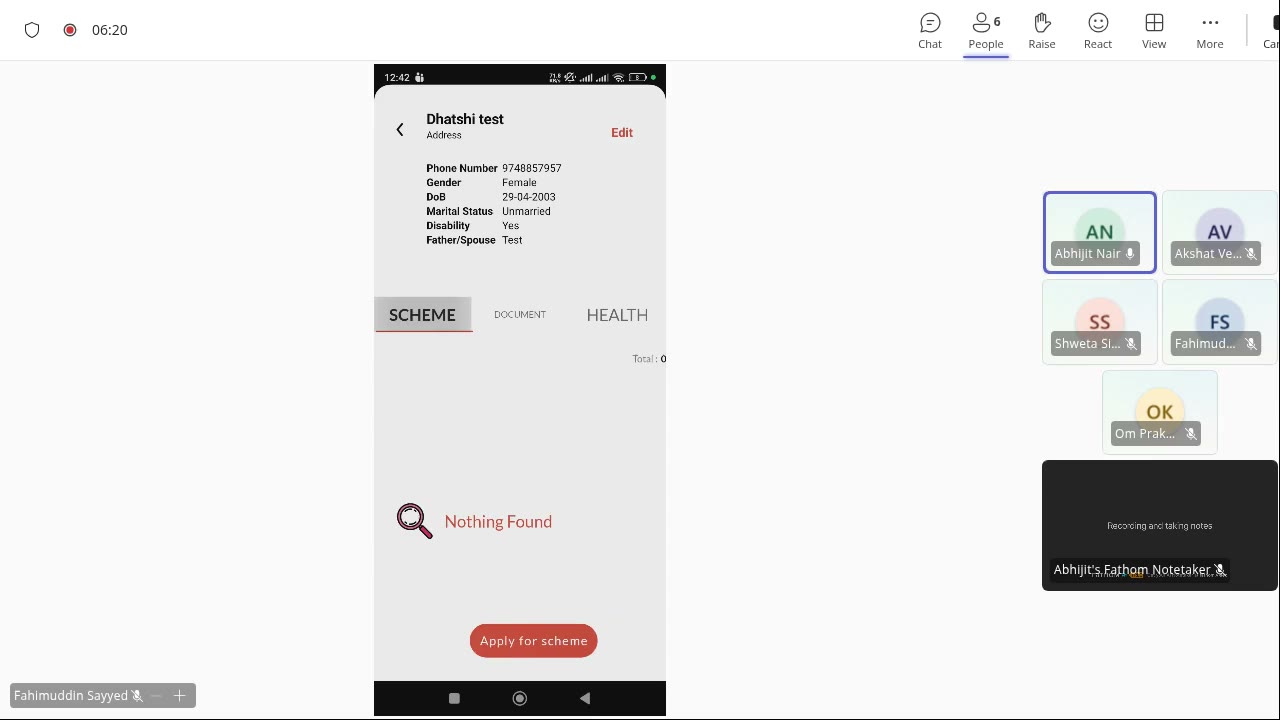
V2 Member Profile detail with three child-program tabs (SCHEME / DOCUMENT / HEALTH) and "Apply for scheme" CTA. Captured from the kickoff screenshare (~6 min).
Update Member flow
From PM Update Member tab — 5 rows:
- Enter Name (while firing workflow).
- Lookup for the Member with this Name for the Location of the User — confirms scoping is by user's assigned location.
- Display the values stored as defaults.
- All fields except Name can be updated and stored back.
Related
Last updated 2026-05-04